

Inhalt
- Zwei Betriebsarten, ein gemeinsames System
- Was die Windows-Anwendung übernimmt
- Was der Nano autonom erledigt
- Die zehn Sounds in der Bedienoberfläche
- Dauer, Zufall und feste Intervalle
- Status, Warteschlange und Diagnose
- Die Tests vor Version 1.0.0
- Quellcode, Dokumentation und Download
- Eigene Anpassungen bleiben möglich
Zwei Betriebsarten, ein gemeinsames System
Das MOBA-Module Soundmodul besteht in Version 1.0.0 aus Hardware, Firmware und Windows-Anwendung. Die Anwendung ist ein wesentlicher Bedien- und Steuerungsteil. Sie ist weder ein einmalig verwendetes Einstellprogramm noch eine nebensächliche Ergänzung. Gleichzeitig bleibt der Arduino Nano ohne aktive PC-Sitzung eigenständig nutzbar. Sie gehören zum selben System, sind aber nicht gleichzeitig für die Auslösung aktiv.
Im Softwarebetrieb besteht eine PC-Sitzung. Die Windows-Anwendung kann Sounds manuell starten, die Softwareautomatik nutzen, Lautstärke und Konfiguration ändern und den aktuellen Zustand überwachen. Die zehn Hardwareeingänge werden in diesem Modus ignoriert. Das verhindert, dass Eingangskontakte und Softwareautomatik gleichzeitig dieselbe Warteschlange füllen. Im Eingangsmodus ist es umgekehrt: IN1 bis IN10 lösen die fest zugeordneten Sounds aus, während manuelle PLAY-Befehle und Softwareautomatik deaktiviert sind.
Beginnt eine PC-Sitzung, löscht die Firmware ausstehende Eingangswünsche und setzt die Softwarezeitpläne zurück. Ein bereits laufender Sound darf regulär enden; die Oberfläche erkennt seinen Zustand über BUSY. Die Automatik startet nicht ungefragt, sondern wird zunächst deaktiviert. Beim Beenden der Sitzung wechselt der Nano zurück in den Eingangsmodus. Damit sind Herkunft und Verantwortung jeder neuen Anforderung eindeutig.
Bleibt die PC-Kommunikation länger als ungefähr vier Sekunden aus, erfolgt derselbe Rückfall. Die Sitzung wird beendet, die Softwareautomatik abgeschaltet, die FIFO-Warteschlange geleert und die Zeitpläne werden zurückgesetzt. Läuft noch ein Sound oder ist der Player nicht sicher bereit, setzt die Firmware das JQ6500 zurück. Ein zuverlässig bestätigter unmittelbarer STOP-Befehl steht nicht zur Verfügung. Der Reset schafft deshalb einen definierten Ausgangszustand.
Was die Windows-Anwendung übernimmt
Die Windows-Anwendung wurde in PureBasic entwickelt. Der offizielle Build der Version 1.0.0 entstand mit PureBasic 6.40 für Windows x64. Die Bedienoberfläche ist deutsch, während Bezeichner und Kommentare im Quellcode englisch gehalten sind. PureBasic stellt das Hauptprogramm und die serielle Kommunikation bereit. Die sichtbare Oberfläche läuft in WebView2; HTML, CSS und JavaScript werden beim Kompilieren eingebettet. Neben der fertigen EXE sind daher keine externen UI-Dateien erforderlich.
Beim Start sucht die Anwendung automatisch nach vorhandenen COM-Ports und prüft, ob dort die erwartete Firmwarekennung antwortet. Die Kommunikation mit dem Nano läuft mit 115.200 Baud. Ein Port kann zusätzlich manuell ausgewählt werden. Nach erfolgreicher Erkennung startet die Anwendung eine PC-Sitzung und hält sie durch regelmäßige Kommunikation aktiv. Der erkannte Port, die Firmwareversion und der Verbindungszustand werden angezeigt. Nach einem Abbruch versucht die Anwendung erneut, eine passende Verbindung aufzubauen.
Die Oberfläche erlaubt die manuelle Wiedergabe der Sounds 1 bis 10. Sie stellt die Lautstärke von 0 bis 30 ein, wechselt zwischen SOFTWARE und INPUTS, aktiviert oder deaktiviert die Automatik, setzt den Zufallsbereich und überträgt die Konfiguration einzelner Sounds. Sie kann Konfiguration und Status neu lesen, einen Reset auslösen und eine Medienprüfung starten. Damit ist sie für laufende Bedienung, Beobachtung, Tests und Konfigurationsarbeit vorgesehen.
Die Anwendung bildet die Firmwarezustände ab. In READY stehen Soundsteuerung, Konfiguration, Moduswechsel, Reset und Lautstärke zur Verfügung. Während STARTING oder PLAYING werden weitere PLAY-Befehle, Konfigurationsänderungen, Moduswechsel und Medienprüfung gesperrt. Reset und Lautstärke bleiben verfügbar. In RESETTING bleibt die Bedienung eingeschränkt, bis der Abschluss gemeldet wurde. Diese Sperren sind kein reines Oberflächendesign, sondern entsprechen den Regeln des seriellen Protokolls.
Die Anwendung speichert ihre eigenen Verbindungsangaben, während die eigentliche Soundkonfiguration im Nano liegt. Beim erneuten Verbinden kann sie deshalb den aktuellen Stand vom Gerät anfordern, statt sich auf einen veralteten lokalen Zustand zu verlassen. Diese Trennung ist wichtig: Die Oberfläche zeigt und ändert die Firmwarekonfiguration, aber die gültigen Automatikwerte bleiben auch nach einem Neustart des Windows-Programms im Nano erhalten.
So bleibt die gespeicherte Gerätekonfiguration die maßgebliche technische Quelle.
Was der Nano autonom erledigt
Der Nano ist für die zeitkritischen und dauerhaften Aufgaben zuständig. Er steuert das JQ6500 über die 9.600-Baud-UART-Verbindung, liest BUSY analog an A2, entprellt BUSY und die Hardwareeingänge, verwaltet die Wiedergabezustände und bedient die FIFO-Warteschlange. Auch die Zeitsteuerung für Dauer-, Zufalls- und Intervallwiedergabe läuft auf dem Nano. Die Windows-Anwendung gibt Einstellungen und Befehle vor, aber der Ablauf einer einmal gestarteten Automatik wird von der Firmware organisiert.
Ohne aktive PC-Sitzung erzwingt die Firmware den Eingangsmodus. Dann lösen IN1 bis IN10 die fest zugeordneten Sounds 1 bis 10 aus. Der Nano benötigt weder die Windows-Anwendung noch einen weiteren Rechner, um diese Kontakte zu verarbeiten. Das ist die Standalone-Funktion. Sie ersetzt die Anwendung nicht, sondern stellt den zweiten Betriebsweg bereit. Wer die aktive Softwarebedienung, Konfiguration und Diagnose nutzen möchte, arbeitet im Softwaremodus; wer nur Kontakte auswerten möchte, nutzt INPUTS.
Die Konfiguration liegt im internen EEPROM des Nano. Gespeichert werden Steuerungsmodus, Automatikstatus, Zufallsunter- und -obergrenze, Lautstärke sowie für jeden Sound die Kennzeichen für Dauer-, Zufalls- und Intervallwiedergabe und die Intervallzeit. Eine Kennung, eine Konfigurationsversion und eine CRC-Prüfsumme schützen gegen ungültige Daten. Erkennt die Firmware beim Start eine fehlerhafte Struktur, setzt sie Standardwerte und speichert eine neue gültige Konfiguration.
EEPROM.update schreibt nur Bytes, die sich tatsächlich geändert haben. Das reduziert unnötige Schreibvorgänge. Die Standardwerte sind Lautstärke 15, Zufallsbereich 120 bis 600 Sekunden und Intervallzeit 300 Sekunden. Zulässig sind Zeitwerte von 1 bis 86.400 Sekunden. Für Konfiguration und Firmware wird ausschließlich der interne Speicher des Nano verwendet. Ein externer EEPROM oder FRAM ist nicht Teil der Version 1.0.0.
Die zehn Sounds in der Bedienoberfläche
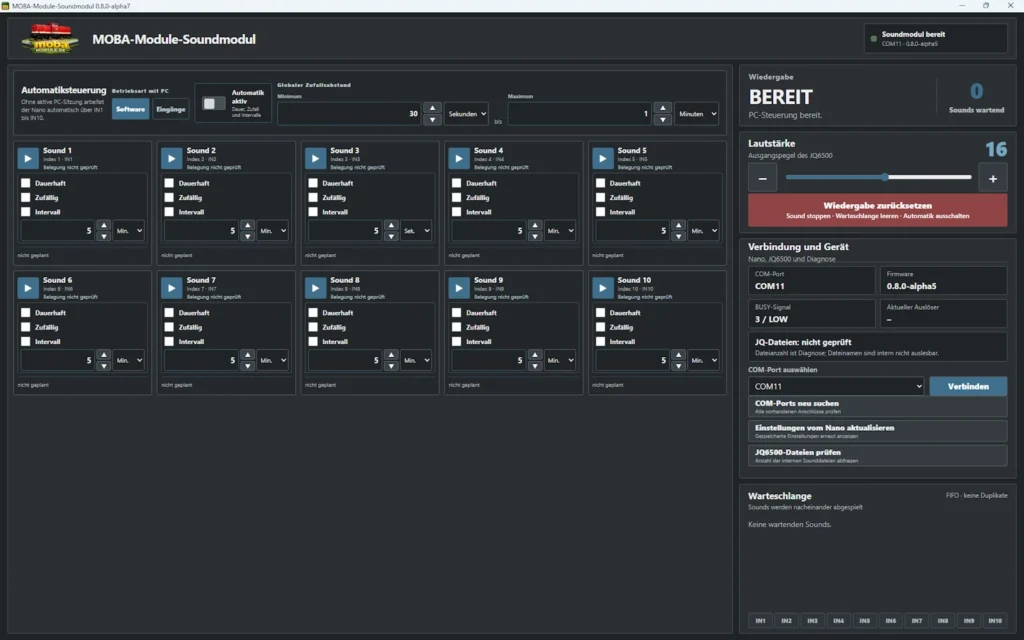
Die Windows-Anwendung zeigt zehn Soundpositionen. Jede Position entspricht dem gleich nummerierten Index im JQ6500-Flash. Ein Klick auf PLAY fordert den jeweiligen Sound im Softwarebetrieb manuell an. Die Oberfläche kennt dabei keine Dateinamen, weil das JQ6500 sie über die verwendete Schnittstelle nicht bereitstellt. Wer beispielsweise eine Bahnhofsansage auf Sound 3 und eine Werkstatt auf Sound 7 legt, dokumentiert diese Zuordnung außerhalb des Moduls.
Für jeden Sound können drei Automatikkennzeichen gesetzt werden: Dauerwiedergabe, Zufallswiedergabe und Intervallwiedergabe. Zusätzlich besitzt jeder Sound eine eigene Intervallzeit. Diese Konfiguration betrifft den Soundindex, nicht den Hardwareeingang. Die Eingangszuteilung bleibt fest: IN1 spielt Sound 1 bis IN10 spielt Sound 10. Version 1.0.0 besitzt keine frei konfigurierbare Eingangsmatrix und keine Möglichkeit, IN2 etwa direkt Sound 8 zuzuweisen.
Die Einstellungen eines Sounds werden als gemeinsamer Konfigurationsbefehl übertragen. Die Firmware prüft Soundnummer, Kennzeichen und Zeitwert. Werte außerhalb des zulässigen Bereichs werden abgewiesen. Nach einer Änderung entfernt sie denselben Sound aus der Warteschlange und plant ihn bei aktiver Automatik mit den neuen Werten erneut. Die Anwendung kann anschließend die vollständige Konfiguration zurücklesen und in der Oberfläche darstellen.
Eine Medienprüfung ergänzt diese Ansicht. Sie fragt die Anzahl der Dateien im internen JQ6500-Speicher ab. Das funktioniert nur, wenn der Player bereit ist, kein Sound läuft, die Warteschlange leer und die Automatik ausgeschaltet ist. Die Antwort enthält eine Zahl, aber keine Namen. Die Prüfung zeigt also, ob grundsätzlich Dateien vorhanden sind, kann jedoch nicht beurteilen, welcher Inhalt an welcher Position liegt.
Dauer, Zufall und feste Intervalle
Die Automatik der Version 1.0.0 unterstützt Dauerwiedergabe, Zufallswiedergabe und Intervallwiedergabe. Sie ist nur im Softwarebetrieb mit aktiver PC-Sitzung verfügbar. Beim Einschalten der Automatik leert die Firmware zunächst die Warteschlange und setzt alle Zeitpläne zurück. Danach richtet sie die aktivierten Funktionen für jeden der zehn Sounds neu ein. Hardwareeingänge bleiben währenddessen ohne Wirkung.
Bei Dauerwiedergabe wird der Sound beim Start der Automatik in die FIFO-Warteschlange gestellt. Nach seinem bestätigten Ende reiht ihn die Firmware erneut ein. Andere bereits wartende Sounds werden vorher nach FIFO abgearbeitet. Dauer bedeutet deshalb nicht, dass ein einzelner Sound alle anderen blockiert. Es bedeutet, dass er nach jeder vollständigen Wiedergabe erneut angefordert wird, sofern die Automatik aktiv bleibt.
Für Zufallswiedergabe gilt ein globaler Bereich mit Mindest- und Höchstzeit. Für jeden entsprechend markierten Sound berechnet die Firmware einen neuen Zeitpunkt innerhalb dieses Bereichs. Nach der Anforderung wird der nächste Zufallszeitpunkt geplant. Die Zufallsquelle wird unter anderem mit dem unbeschalteten Analogeingang A3 initialisiert. Der Wertebereich reicht von einer Sekunde bis 86.400 Sekunden.
Bei Intervallwiedergabe besitzt jeder Sound seine eigene Intervallzeit. Nach Ablauf wird der Sound eingereiht und das nächste Intervall geplant. Diese Werte sind Verzögerungen in Sekunden. Version 1.0.0 arbeitet nicht mit festen Uhrzeiten, Kalenderdaten, Wochenplänen oder einer Echtzeituhr. Eine gesonderte einmalige Verzögerungsfunktion gehört ebenfalls nicht zum veröffentlichten Stand. Die Oberfläche kann Zeiten lesbar darstellen, ändert aber nicht dieses technische Prinzip.
Status, Warteschlange und Diagnose
Die Anwendung zeigt den Playerzustand OFFLINE, READY, STARTING, PLAYING oder RESETTING. Dazu kommen BUSY und der analoge BUSY-Rohwert, die aktuelle Soundnummer, die Auslöseart, eine zugehörige Eingangsnummer, Lautstärke, Betriebsart, Automatikstatus, Eingangsmaske und Laufzeit. Diese Angaben helfen, Bedienung und Hardwarezustand gemeinsam zu beurteilen. Ein PLAY-Befehl kann beispielsweise gesendet worden sein, während BUSY noch auf den tatsächlichen Start wartet.
Die gemeinsame FIFO-Warteschlange innerhalb der aktiven Betriebsart besitzt Platz für höchstens zehn Soundnummern. Zuerst eingegangene Anforderungen werden zuerst abgespielt. Die Firmware unterscheidet MANUAL, PERMANENT, RANDOM, INTERVAL und INPUT. Ein Sound darf sich nur einmal gleichzeitig in Wiedergabe oder Warteschlange befinden. Wird derselbe Sound erneut angefordert, meldet die Firmware den übersprungenen Doppeleintrag. Ist die Warteschlange mit verschiedenen Sounds voll, wird ein weiterer Eintrag abgewiesen und als Fehler protokolliert.
Die Oberfläche zeigt Warteschlangenlänge und Einträge. Sie verarbeitet außerdem Ereignisse für Start, Ende, Reset, ignorierte Eingänge, Start-Timeouts und Verbindungswechsel. Ein Kommunikationsprotokoll und eine Liste letzter Ereignisse machen sichtbar, welche Befehle gesendet und welche Antworten empfangen wurden. Diese Diagnose ist ein wesentlicher Grund, die Windows-Anwendung während Aufbau und Betrieb aktiv einzusetzen.
Ein Reset deaktiviert die Automatik, leert die Warteschlange, setzt Zeitpläne zurück und initialisiert das JQ6500 neu. Danach wird die gewählte Lautstärke wieder gesetzt. Die Firmware meldet Beginn und Ende des Resets und liefert anschließend Status und Warteschlange. Der Reset dient auch beim Rückfall in den Eingangsmodus als bestätigte Abbruchmethode, falls ein Sound läuft und kein sicherer unmittelbarer STOP verfügbar ist.
Die Tests vor Version 1.0.0
Vor der Veröffentlichung wurden Versorgung, gemeinsame Masse und SGND geprüft. R1 mit 1 kΩ saß in der Leitung Nano D11 zum JQ6500-RX, R2 mit 1 kΩ in der BUSY-Leitung zu A2. UART-Verbindung und Lautsprecheranschluss zwischen SPK+ und SPK− wurden kontrolliert. Keine Lautsprecherleitung führte zu GND. Die BUSY-Werte wurden mit eingebautem R2 erneut gemessen: ungefähr 2 bis 3 ADC-Schritte im Leerlauf und 537 bis 540 während der Wiedergabe.
Geprüft wurden Beginn und Ende der Wiedergabe, BUSY-Hysterese, 30-Millisekunden-Entprellung und der Start-Timeout von ungefähr 1,5 Sekunden. Die FIFO-Reihenfolge und die Unterdrückung doppelter Soundeinträge wurden kontrolliert. Alle zehn Eingänge wurden mit ihrer festen Zuordnung getestet. Ebenso wurden Umschaltung zwischen PC-Sitzung und Eingangsmodus, Rückfall nach Kommunikationsausfall und Speicherung im EEPROM geprüft.
Die Windows-Anwendung lief auf dem Entwicklungsrechner und zusätzlich auf einem zweiten Windows-Rechner. Der Release-Build wurde mit PureBasic 6.40 für Windows x64 erzeugt. Bestätigt wurden eine PE32+-GUI-Anwendung, Datei- und Produktversion 1.0.0.0, eingebettetes Icon, Versionsressource, Anwendungsmanifest, Ausführung als normaler Benutzer mit asInvoker, DPI-Awareness, ASLR, DEP/NX und die gemeinsame Windows-UCRT. Administratorrechte sind nicht erforderlich.
Die EXE besitzt keine Authenticode-Signatur. Windows SmartScreen kann bei einer neuen, unsignierten Datei ohne aufgebaute Reputation warnen. Eine solche Warnung ist nicht automatisch ein Nachweis für Schadsoftware. Sie macht vielmehr deutlich, dass Windows den Herausgeber nicht über eine digitale Signatur bestätigen kann. Die veröffentlichte SHA-256-Prüfsumme dient dazu, die heruntergeladene Datei mit dem angegebenen Release zu vergleichen.
Quellcode, Dokumentation und Download
Die Windows-Datei heißt MOBA-Module-Soundmodul-1.0.0-Windows-x64.exe. Ihre SHA-256-Prüfsumme lautet f7e7f848cc7c67181d3f7ac73f5abb816b72dacdd0afa2af39682b97c81c2946. EXE-Dateien liegen nicht im Quellcode-Branch, sondern werden als Dateien des jeweiligen GitHub-Releases bereitgestellt. Die Prüfsumme sollte nach dem Download mit der lokalen Datei verglichen werden.
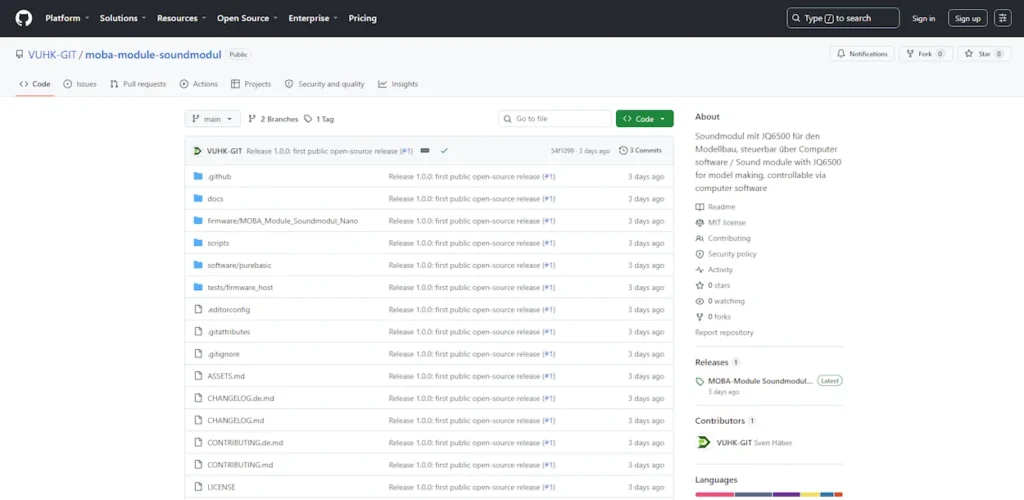
Das Repository enthält die Arduino-Firmware, den PureBasic-Quellcode, die eingebettete Weboberfläche sowie deren modulare CSS- und JavaScript-Quellen. Hinzu kommen deutsche und englische Dokumentation, Verdrahtungspläne, verbindliche Netzliste, Hinweise zum Bespielen des JQ6500, Build-Anleitung, Tests, Prüf- und Paketierungsskripte, Lizenz- und Markenhinweise sowie Angaben zu Drittkomponenten. Sounddateien und der proprietäre JQ6500-Uploader sind nicht enthalten.
Für einen eigenen Windows-Build werden Windows 10 oder 11, PureBasic 6.10 LTS oder neuer in x64, Microsoft WebView2 Runtime, Python 3.10 oder neuer und ein vollständig ausgechecktes Repository benötigt. Ein Python-Skript erzeugt die eingebettete HTML-Datei. PureBasic bindet sie per IncludeBinary in die EXE ein. Das offizielle Logo und Icon gehören nicht zur MIT-Lizenz und werden nur in einem autorisierten Markenbuild verwendet.
- Aktuelle Version und Downloads
- Quellcode und Dokumentation auf GitHub
- Fehler melden oder Verbesserung vorschlagen
Eigene Anpassungen bleiben möglich
Quellcode und Dokumentation stehen unter der MIT-Lizenz. Dadurch können Aufbau und Ablauf geprüft, eigene Builds erstellt und Änderungen vorgenommen werden. Das Repository kann geforkt werden. Fehler und konkrete Verbesserungsvorschläge lassen sich über Issues melden; Änderungen können als Pull Request vorgeschlagen werden. Diese Offenheit betrifft den technischen Inhalt, nicht die geschützte Kennzeichnung.
Name, Logo und Icon von MOBA-Module sind nicht Bestandteil der MIT-Lizenz. Eine veränderte Firmware, eigene Platine oder andere Bedienoberfläche darf daher nicht als offizielles MOBA-Module-Release ausgegeben werden. Sinnvolle Anpassungen sind beispielsweise eigene Sounddateien, ein Gehäuse, Lochraster oder eigene PCB, angepasste Eingangslogik in einer eigenen Firmware, eine andere Oberfläche oder die Einbindung in eine Anlagensteuerung.
Solche Änderungen müssen die Grenzen der Version 1.0.0 nicht verschweigen. Wer eine freie Eingangsmatrix, Uhrzeitsteuerung oder zusätzliche Speicherhardware ergänzt, entwickelt eine neue Funktion außerhalb des veröffentlichten Stands. Die Ausgangsversion bleibt klar dokumentiert: zehn feste Eingänge, zehn Soundindizes, zwei getrennte Betriebsarten, drei Automatikformen und eine Windows-Anwendung, die aktive Bedienung, Konfiguration und Diagnose übernimmt.
Für eigene Ableitungen ist außerdem sinnvoll, Prüfungen und Versionsangaben mitzunehmen. Eine Änderung an Warteschlange, Protokoll oder Zeitsteuerung kann Auswirkungen auf Firmware und Oberfläche zugleich haben. Ein eigener Build sollte deshalb eine eigene Versionskennung, nachvollziehbare Testfälle und passende Dokumentation erhalten. So bleibt er von der geprüften Version 1.0.0 unterscheidbar.
Version 1.0.0 bildet damit einen geprüften Ausgangspunkt. Das System kann unverändert nachgebaut oder auf Grundlage der veröffentlichten Quellen angepasst werden. Entscheidend ist, technische Änderungen nachvollziehbar zu dokumentieren und veränderte Fassungen eindeutig als eigene Ableitung zu kennzeichnen.
English version
Two operating modes, one system
The MOBA-Module sound module version 1.0.0 consists of hardware, firmware and the Windows application. The application is an essential control and operating component. It is neither a one-time setup utility nor an unimportant extra. At the same time, the Arduino Nano remains usable without an active PC session. These two operating paths are called SOFTWARE and INPUTS. They belong to one system but are not active as sound-trigger sources at the same time.
In software mode an active PC session exists. The Windows application can start sounds manually, use software automation, change volume and configuration, and monitor the current state. The ten hardware inputs are ignored in this mode. This prevents input contacts and software automation from filling the same queue at the same time. In input mode the opposite applies: IN1 to IN10 trigger their fixed sound numbers, while manual PLAY commands and software automation are disabled.
Starting a PC session clears pending hardware-input requests and resets the software schedules. A sound that is already playing may finish normally, and the interface follows its state through BUSY. Automation does not start without an explicit command; it is initially disabled. When the session ends, the Nano returns to input mode. The source and responsibility of every new request therefore remain unambiguous.
The same fallback occurs when valid PC communication is absent for about four seconds. Firmware ends the session, disables software automation, clears the FIFO queue and resets its schedules. If a sound is still running or the player is not safely ready, firmware resets the JQ6500. No reliably confirmed immediate STOP command is available, so reset provides a defined state.
What the Windows application handles
The Windows application was developed in PureBasic. The official version 1.0.0 build was created with PureBasic 6.40 for Windows x64. The user interface is German, while identifiers and source comments are in English. PureBasic provides the main program and serial communication. The visible interface runs in WebView2; HTML, CSS and JavaScript are embedded during compilation. The finished EXE therefore does not need external user-interface files beside it.
At startup the application searches available COM ports and probes them for the expected firmware identity. Communication with the Nano runs at 115,200 baud. A specific port can also be selected manually. After successful recognition the application opens a PC session and keeps it active through regular communication. The detected port, firmware version and connection state are displayed. After a disconnection, the program can start another connection attempt.
The interface supports manual playback of sounds 1 to 10. It sets volume from 0 to 30, switches between SOFTWARE and INPUTS, enables or disables automation, changes the random range and sends the configuration for individual sounds. It can reload configuration and status, reset the player and run a media count. This makes it suitable for active operation, monitoring, testing and configuration work.
The application follows the firmware states. In READY, sound controls, configuration, mode switching, reset and volume are available. During STARTING or PLAYING, additional PLAY commands, configuration changes, mode changes and media scans are locked. Reset and volume remain available. During RESETTING, controls remain restricted until completion is reported. These restrictions mirror the serial protocol rather than being arbitrary interface choices.
Connection settings belong to the application, while the actual sound configuration remains stored in the Nano. After reconnecting, the application can request the current device values instead of trusting stale local data. The firmware configuration therefore remains authoritative even after the Windows program has been closed and restarted.
What the Nano handles autonomously
The Nano performs the time-critical and persistent tasks. It controls the JQ6500 through the 9,600-baud UART, reads BUSY as an analog value on A2, debounces BUSY and the hardware inputs, manages the playback states and maintains the FIFO queue. Timing for continuous, random and interval playback also runs on the Nano. The Windows application supplies settings and commands, but firmware organises an automation sequence once it has been enabled.
Without an active PC session, firmware forces input mode. IN1 to IN10 then trigger the fixed sounds 1 to 10. No Windows application or additional computer is required to process these contacts. This is the standalone function. It does not replace the application; it provides the second operating path. Active software control, configuration and diagnostics use software mode, while contact-only operation uses INPUTS.
Configuration is stored in the Nano internal EEPROM. It includes the configured control mode, automation state, lower and upper random limits, volume, and for each sound the continuous, random and interval flags plus interval time. A magic identifier, configuration version and CRC protect against invalid data. If firmware detects an invalid structure during startup, it installs defaults and saves a new valid configuration.
EEPROM.update writes only bytes that have actually changed, reducing unnecessary writes. Defaults are volume 15, a random range from 120 to 600 seconds and an interval of 300 seconds. Valid timing values range from 1 to 86,400 seconds. Firmware and configuration use only the Nano internal memory. External EEPROM or FRAM is not part of version 1.0.0.
The ten sounds in the user interface
The Windows application presents ten sound positions. Each position corresponds to the same numbered index in JQ6500 flash. Selecting PLAY requests that sound manually in software mode. The interface does not know file names because the JQ6500 does not expose them through the used protocol. A user who stores a station announcement as sound 3 and a workshop ambience as sound 7 must document that mapping outside the module.
Each sound has three automation flags: continuous playback, random playback and interval playback. Every sound also has its own interval time. These settings belong to the sound index, not to a hardware-input assignment. Input mapping stays fixed: IN1 plays sound 1 through IN10 playing sound 10. Version 1.0.0 has no freely configurable input matrix and cannot directly remap IN2 to sound 8.
Settings for one sound are transmitted as one configuration command. Firmware validates the sound number, flags and timing value. Invalid ranges are rejected. After a change, firmware removes that sound from the queue and, when automation is active, schedules it again with the new values. The application can then read back the full configuration and display it.
A media scan complements this view. It asks the JQ6500 for the number of files in internal flash. The player must be ready, no sound may be active, the queue must be empty and automation must be off. The reply contains a count but no file names. The check confirms that files are present without replacing the user’s external list of assignments.
Continuous, random and fixed intervals
Version 1.0.0 automation supports continuous playback, random playback and interval playback. Automation is available only in software mode with an active PC session. When automation is enabled, firmware first clears the queue and resets all schedules. It then initialises the enabled functions for each of the ten sounds. Hardware inputs remain inactive in this mode.
With continuous playback, the sound is put into the FIFO queue when automation starts. After its confirmed end, firmware queues it again. Other sounds that are already waiting are processed first according to FIFO order. Continuous therefore does not mean that one sound blocks every other request. It means that the sound is requested again after each completed playback while automation remains enabled.
Random playback uses one global minimum and maximum range. Firmware calculates a new target time inside that range for each sound marked as random. After the request is queued, another random time is planned. The random generator is also seeded from the unconnected analog input A3. Valid values range from one second to 86,400 seconds.
Interval playback stores an individual interval for every sound. After the delay expires, that sound is queued and the next interval is planned. These values are delays in seconds. Version 1.0.0 does not use clock times, calendar dates, weekly plans or a real-time clock. It also has no separate one-time delay function. The user interface may present values in a readable form, but it does not change this technical principle.
Status, queue and diagnostics
The application displays OFFLINE, READY, STARTING, PLAYING or RESETTING. It also shows BUSY, the analog BUSY raw value, current sound, trigger type, associated input number, volume, control mode, automation state, input mask and uptime. These fields allow the operator to compare user actions with the hardware state. A PLAY command may already have been sent while the firmware is still waiting for confirmed BUSY.
The FIFO queue within the active operating mode can hold up to ten sound numbers. Requests are played in arrival order. Firmware distinguishes MANUAL, PERMANENT, RANDOM, INTERVAL and INPUT. A sound may exist only once as the current item or in the queue. Repeating the same sound produces a diagnostic duplicate message instead of another queued copy. If ten different requests fill the queue, another item is rejected and logged rather than replacing an older request.
The interface displays queue length and entries. It also processes events for playback start and end, reset, ignored inputs, start timeouts and connection changes. A communication log and recent-event list show which commands were sent and which responses arrived. These diagnostic functions are an important reason to use the Windows application actively during construction, testing and normal software-controlled operation.
Reset disables automation, clears the queue, resets schedules and reinitialises the JQ6500. The selected volume is then restored. Firmware reports reset start and completion and sends status and queue information afterwards. Reset is also the confirmed abort method during fallback to input mode if playback is active and no safe immediate STOP is available.
Tests before version 1.0.0
Before release, the supply, common ground and SGND were checked. R1 with 1 kΩ was installed between Nano D11 and JQ6500 RX, while R2 with 1 kΩ was installed in the BUSY line to A2. UART and the loudspeaker connection between SPK+ and SPK− were verified. Neither loudspeaker lead connected to GND. With R2 installed, BUSY measured approximately 2 to 3 ADC steps when idle and 537 to 540 during playback.
Playback start and end, BUSY hysteresis, 30-millisecond debounce and the approximate 1.5-second start timeout were tested. FIFO order and duplicate suppression were checked. All ten hardware inputs were tested with their fixed mapping. Switching between a PC session and input mode, communication-loss fallback and EEPROM persistence were also verified.
The Windows application was tested on the development computer and on a second Windows computer. The release build was produced with PureBasic 6.40 for Windows x64. Confirmed properties include a PE32+ GUI executable, file and product version 1.0.0.0, embedded icon, version resource, application manifest, normal-user execution with asInvoker, DPI awareness, ASLR, DEP/NX and the shared Windows UCRT. Administrator rights are not required.
The EXE has no Authenticode signature. Windows SmartScreen may warn about a new unsigned file without established reputation. Such a warning is not automatically proof of malware; it means that Windows cannot verify the publisher through a digital signature. The published SHA-256 checksum allows the downloaded file to be compared with the stated release.
Source code, documentation and download
The Windows file is named MOBA-Module-Soundmodul-1.0.0-Windows-x64.exe. Its SHA-256 checksum is f7e7f848cc7c67181d3f7ac73f5abb816b72dacdd0afa2af39682b97c81c2946. Executables are not committed to the source branch; they are attached to the corresponding GitHub release. The checksum should be compared with the local file after download.
The repository contains Arduino firmware, PureBasic source code, the embedded web interface and its modular CSS and JavaScript sources. It also contains German and English documentation, wiring diagrams, the authoritative netlist, JQ6500 loading instructions, build documentation, tests, validation and packaging scripts, licensing and trademark notices, and third-party information. It includes neither sound files nor the proprietary JQ6500 uploader.
Building the Windows application requires Windows 10 or 11, PureBasic 6.10 LTS or newer in x64, Microsoft WebView2 Runtime, Python 3.10 or newer and a complete repository checkout. A Python script prepares the embedded HTML file. PureBasic includes it in the EXE with IncludeBinary. The official logo and icon are outside the MIT License and are used only for an authorised branded build.
- Current version and downloads
- Source code and documentation on GitHub
- Report an issue or suggest an improvement
Own adaptations remain possible
Source code and documentation are licensed under MIT. Builders can inspect the implementation, create their own builds and make changes. The repository can be forked. Defects and concrete improvement proposals can be filed through Issues, and changes can be proposed as pull requests. This openness applies to the technical material, not to protected branding.
The MOBA-Module name, logo and icon are not part of the MIT License. Modified firmware, a custom PCB or another user interface must therefore not be presented as an official MOBA-Module release. Practical adaptations include personal sound files, an enclosure, stripboard or a custom PCB, changed input logic in a derived firmware, another interface or integration into layout control.
Such changes should state clearly where they go beyond version 1.0.0. A free input matrix, clock-time scheduling or additional storage would be new functionality outside the published release. The original version remains clearly defined: ten fixed inputs, ten sound indices, two separate operating modes, three automation types and a Windows application for active control, configuration and diagnostics.
Version 1.0.0 is therefore a tested starting point. It can be reproduced unchanged or adapted from the published sources. Technical changes should remain documented, and derived versions should be labelled clearly as independent modifications.
Before Part 3 is published, the public permalinks of Parts 1 and 2 must be checked. Only then should the series navigation in all three posts be linked completely. This draft deliberately contains no preview or draft URLs.